F♯ augmented ukulele chord
How to play the F♯ augmented chord (also written G♭), written F♯aug, on ukulele. The shape is 3 2 2 1 and it sounds the notes F♯ – A♯ – C♯♯ — free to print or download below.
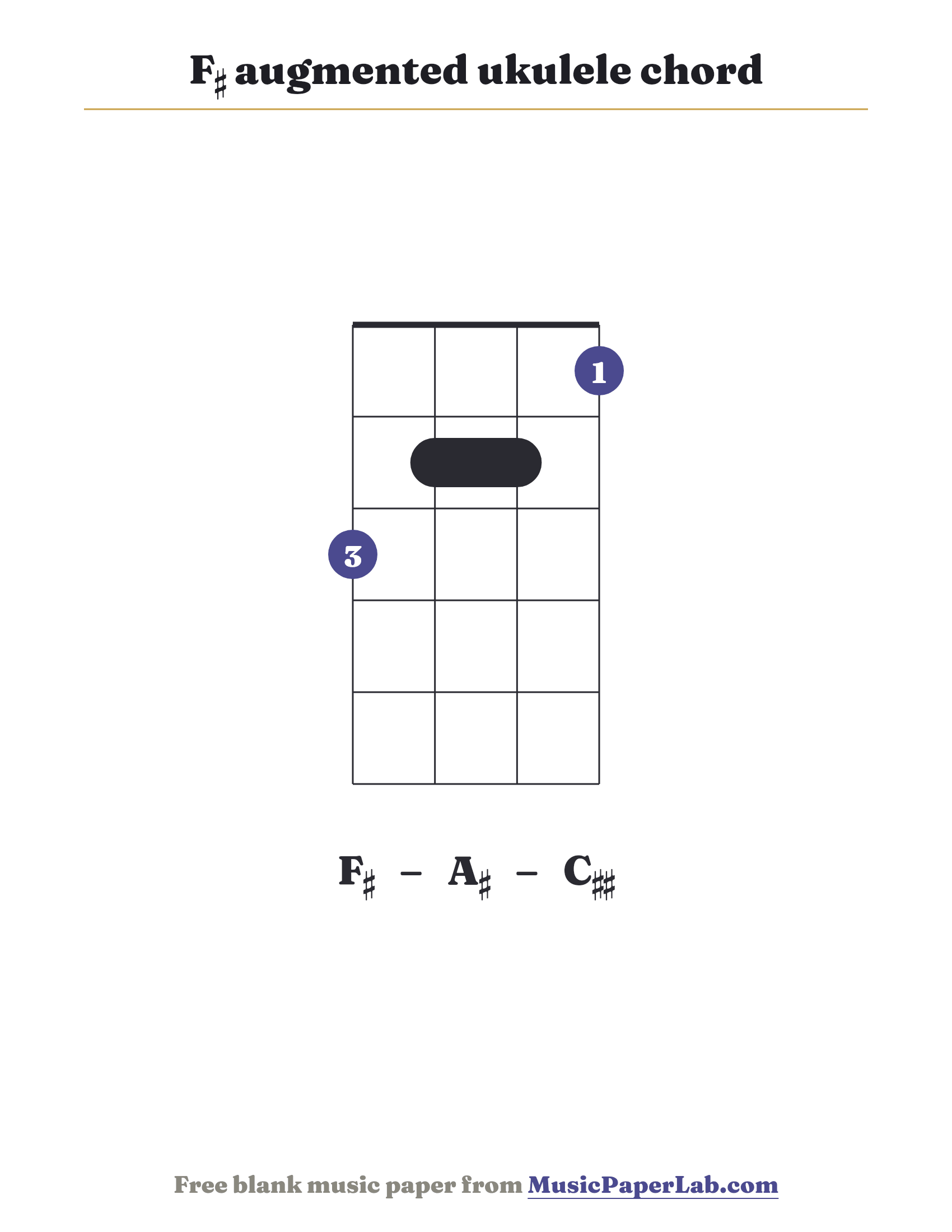
How to play the F♯ augmented chord
- Read the diagram. The four strings are the ukulele’s G-C-E-A (top to bottom). A circle means play the string open; an × means don’t play it. This shape is 3 2 2 1.
- Place your fingers. Lay your first finger flat across the barred fret, then add the other fingers as shown.
- Strum and check. Strum all the played strings and let them ring. The chord sounds the notes F♯ – A♯ – C♯♯.
Notes in the F♯ augmented chord
The F♯ augmented chord contains the notes F♯ – A♯ – C♯♯. The diagram shows the common barre shape, 3 2 2 1 across the four strings.
F♯ augmented ukulele chord — frequently asked questions
How do you play the F♯ augmented chord on ukulele?
Use the shape 3 2 2 1 (strings G-C-E-A): press the dots shown and play the open strings marked with a circle. It sounds the notes F♯ – A♯ – C♯♯.
What notes are in the F♯ augmented chord?
The F♯ augmented chord (F♯aug) contains the notes F♯ – A♯ – C♯♯.
Is the F♯ augmented ukulele chord diagram free?
Yes — print it or download the PDF or PNG for free, with no account or sign-up.